Mermaid to PDF API
POST a mermaid flowchart and get back a PDF, a PNG, an SVG, or an editable diagram kept with your documents. One call, no browser to run, no layout to work out yourself.
Start the free trial $9 a month after 14 days, 2,000 calls a day included. Cancel before the trial ends and you pay nothing.
The whole thing
Get a token, post the diagram, take the PDF. The document it makes stays in the account, so the same id can be fetched as a picture later or handed to a person as a link they can edit.
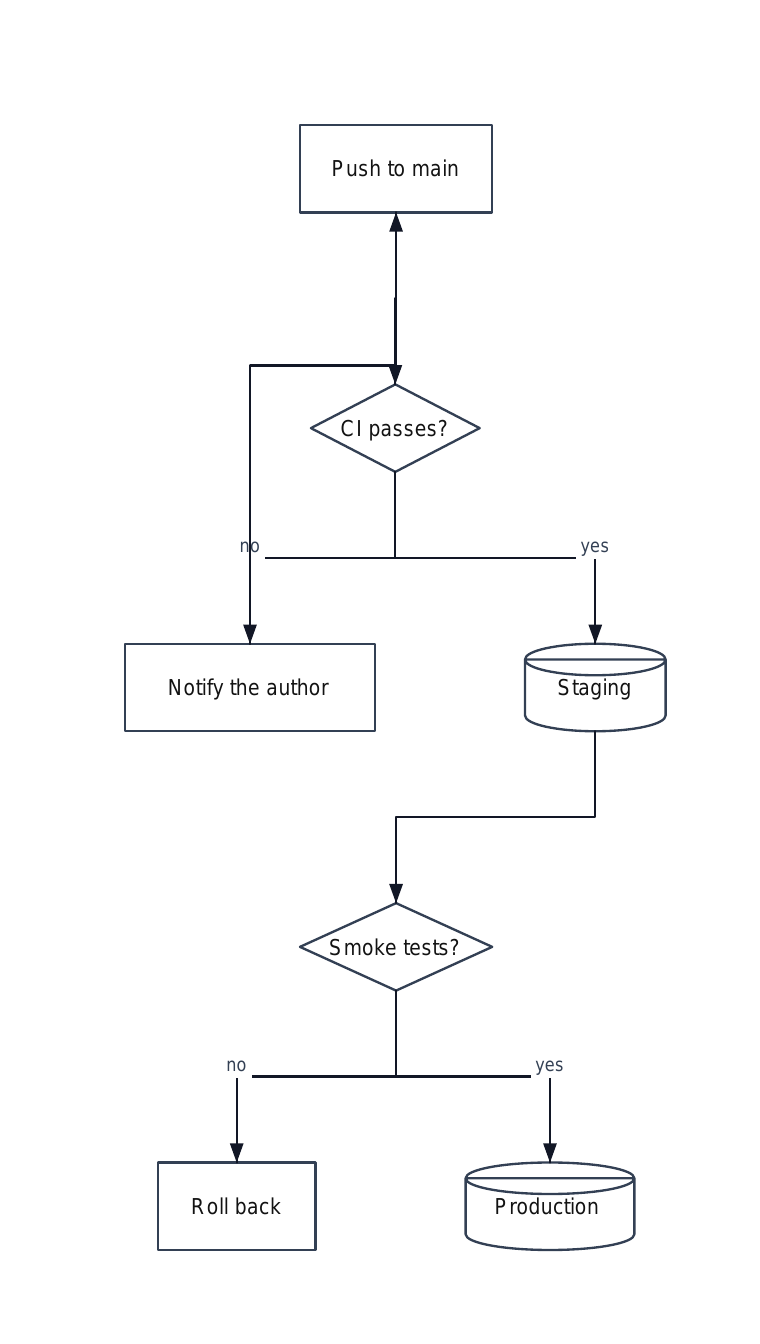
# the mermaid above, as a document
ID=$(curl -s https://docubend.com/api/v1/diagrams \
  -H "Authorization: Bearer $TOKEN" \
  -H "Content-Type: application/json" \
  -d '{
    "title": "Release pipeline",
    "mermaid": "flowchart TD\n  Dev[Push to main] --> CI{CI passes?}\n  CI -->|no| Fix[Notify the author]\n  CI -->|yes| Stage[(Staging)]\n  Stage --> Smoke{Smoke tests?}\n  Smoke -->|no| Roll[Roll back]\n  Smoke -->|yes| Prod[(Production)]\n  Fix --> Dev"
  }' | jq -r .document.id)

# as a PDF, and as a picture
curl -s "https://docubend.com/api/v1/documents/$ID.pdf" \
  -H "Authorization: Bearer $TOKEN" -o pipeline.pdf
curl -s "https://docubend.com/api/v1/documents/$ID.png?dpi=150" \
-H "Authorization: Bearer $TOKEN" -o pipeline.pngconst BASE = "https://docubend.com";
const head = { Authorization: `Bearer ${TOKEN}` };
const mermaid = `flowchart TD
Dev[Push to main] --> CI{CI passes?}
CI -->|no| Fix[Notify the author]
CI -->|yes| Stage[(Staging)]
Stage --> Smoke{Smoke tests?}
Smoke -->|no| Roll[Roll back]
Smoke -->|yes| Prod[(Production)]
Fix --> Dev`;
const r = await fetch(`${BASE}/api/v1/diagrams`, {
method: "POST",
headers: { ...head, "Content-Type": "application/json" },
body: JSON.stringify({ title: "Release pipeline", mermaid }),
});
const { document: doc } = await r.json();
console.log("editable at", doc.links.open);import requests
BASE, head = "https://docubend.com", {"Authorization": f"Bearer {TOKEN}"}
mermaid = """flowchart TD
Dev[Push to main] --> CI{CI passes?}
CI -->|no| Fix[Notify the author]
CI -->|yes| Stage[(Staging)]
Stage --> Smoke{Smoke tests?}
Smoke -->|no| Roll[Roll back]
Smoke -->|yes| Prod[(Production)]
Fix --> Dev"""
doc = requests.post(f"{BASE}/api/v1/diagrams", headers=head, json={
"title": "Release pipeline", "mermaid": mermaid,
}).json()["document"]
open("pipeline.pdf", "wb").write(requests.get(doc["links"]["pdf"], headers=head).content)
print("editable at", doc["links"]["open"])What you get that a renderer does not give you
Services like mermaid.ink and Kroki turn mermaid into a picture, keep nothing, and cost nothing. If a picture is all you need, use one of those. This page is not trying to talk you out of it.
This is for when the diagram has to be a document. What comes back opens in a real editor, so somebody can move a box, add a shape from a library of over 400 stencils, annotate it or comment on it. It is searchable, shareable, and it keeps a version history. And the id stays the same when your pipeline regenerates it, so the link you gave people last month still shows this month's diagram.
Flowcharts, and nothing pretending to be one
flowchart and its older name graph, in all four
directions. Node shapes, rectangles, rounded, stadium, circle, diamond,
hexagon, cylinder, trapezoid, parallelogram, flag. Every arrow form
including dotted and thick and bidirectional, labels in both the
|text| and -- text --> spellings, chains, and
subgraphs, which are laid out as units so a group stays together.
Mermaid's other diagram types are refused by name with a
422 and a sentence explaining why: a sequence diagram, a
class diagram or a gantt chart is not boxes joined by arrows, and turning
one into loose rectangles would produce something that looks like a
diagram and means nothing. A refusal you can read beats a picture you
cannot use.
The layout is ours, because mermaid has none
Mermaid carries no coordinates: it names a direction and leaves the arrangement to whatever draws it. So the import lays it out: nodes are ranked by longest path, so something reached both directly and the long way round sits after the long way and no arrow travels backwards through the picture. Cycles are placed just past whatever points at them. Subgraphs are ranked against each other by the arrows that run between them, and their members only against each other, so a group is a block on the page rather than a box drawn around half the diagram.
The page then grows to fit what arrived, which matters more than it sounds: a hundred-node network chart lays out several thousand pixels across, and a fixed page would put almost all of it off the edge.
And back out again
Any diagram here can be read back as mermaid. GET
/api/v1/documents/<id>.mmd, including one somebody drew by
hand in the editor. What has no spelling in mermaid, such as a pen stroke,
an image or a connector with a loose end, is counted in the response
headers rather than quietly dropped. Diagrams also come in from
.drawio, Visio and SVG, and go back out as
.drawio.
Questions
Which mermaid diagrams are supported?
flowchart and its older name graph, in all four directions. Node shapes, every arrow form including dotted and thick, labels in both spellings, chains, and subgraphs. Sequence, class, state, gantt, pie, journey and mindmap are refused by name with a 422 and a sentence saying why, because turning a sequence diagram into loose rectangles would produce something that looks like a diagram and means nothing.
Do I get a picture, or a diagram?
A diagram. The boxes and arrows are real objects on a page: somebody can open it in the editor, move a box, add a shape from the stencil library, annotate it, share it or comment on it. You can also just take the PDF, PNG or SVG and never open the editor at all.
Where does the layout come from?
From us, because mermaid has no coordinates: it declares a direction and leaves the arrangement to whatever renders it. Nodes are ranked by longest path so the arrows travel one way down the page, and subgraphs are ranked against each other and laid out as units so a group stays together instead of spreading over half the diagram.
Can I get the mermaid back out?
Yes, GET the document with a .mmd extension. What has no spelling in mermaid, such as a pen stroke or a connector with a loose end, is counted in the response headers rather than dropped silently. A round trip keeps the structure, not the arrangement.
How is this different from mermaid.ink or Kroki?
Those render a picture and keep nothing, they are free, and if a picture is all you need they are the right tool. This is for when the diagram has to be a document: kept in an account, editable afterwards, shareable, searchable, with a version history and one URL that stays the same when the diagram is regenerated.
What does it cost?
It is part of Pro at $9 a month and of Enterprise. 2,000 API calls a day on Pro, 20,000 on Enterprise, counted per account. There is no separate charge per diagram.
The rest of it
The full API reference: every call, its parameters and what it answers, in cURL, Python and JavaScript. Or turn Markdown into a PDF the same way, and draw a diagram on top of a PDF by hand.