Markdown to PDF API
POST Markdown and get a PDF with real, selectable text: headings, tables, lists, links and pictures, kept as a document you can share, search and regenerate under the same URL.
Start the free trial $9 a month after 14 days, 2,000 calls a day included. Cancel before the trial ends and you pay nothing.
The whole thing
One call makes the document. A second, later, fetches the PDF, rendered at the moment you ask, so it always matches the document as it stands.
curl -s https://docubend.com/api/v1/pdfs \
  -H "Authorization: Bearer $TOKEN" \
  -H "Content-Type: application/json" \
  -d '{
    "title": "Nightly build",
    "markdown": "# Nightly build\n\n**All green.** 412 tests, 0 failures.\n\n| Suite | Time |\n| --- | --- |\n| unit | 41s |\n| e2e | 2m 03s |"
}'const BASE = "https://docubend.com";
const head = { Authorization: `Bearer ${TOKEN}` };
const report = `# Nightly build, 14 August
**All green.** 412 tests, 0 failures, 4m 06s.
| Suite | Tests | Time |
| --- | --- | --- |
| unit | 288 | 41s |
| end to end | 28 | 2m 03s |
> Deployed to production at 03:12 UTC. No rollback.`;
const r = await fetch(`${BASE}/api/v1/pdfs`, {
method: "POST",
headers: { ...head, "Content-Type": "application/json" },
body: JSON.stringify({ title: "Nightly build", markdown: report }),
});
const { document: doc } = await r.json();import requests
BASE, head = "https://docubend.com", {"Authorization": f"Bearer {TOKEN}"}
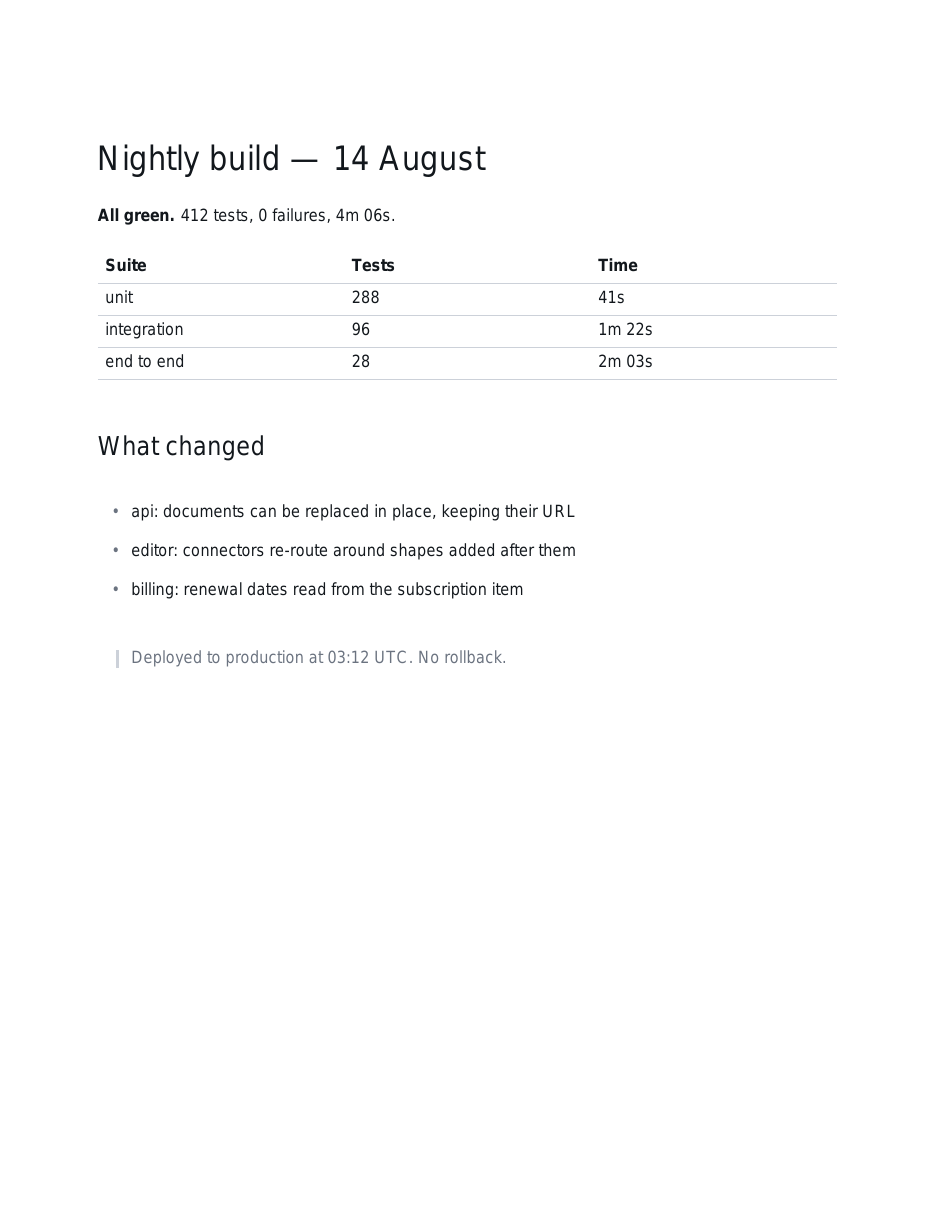
report = """# Nightly build, 14 August
**All green.** 412 tests, 0 failures, 4m 06s.
| Suite | Tests | Time |
| --- | --- | --- |
| unit | 288 | 41s |
| integration | 96 | 1m 22s |
| end to end | 28 | 2m 03s |
## What changed
- api: documents can be replaced in place, keeping their URL
- editor: connectors re-route around shapes added after them
> Deployed to production at 03:12 UTC. No rollback.
"""
doc = requests.post(f"{BASE}/api/v1/pdfs", headers=head,
json={"title": "Nightly build", "markdown": report}
).json()["document"]
open("report.pdf", "wb").write(requests.get(doc["links"]["pdf"], headers=head).content)Real, selectable text
The words are written into the file as text in the standard PDF fonts, so they can be selected, searched and copied. The file is a few kilobytes rather than a few megabytes, and it prints at full resolution on anything. Line breaking uses the same metrics the editor draws with, so a line that fits on screen fits on the page.
Supported: headings, bold, italic, strike-through, inline and fenced code, ordered and unordered lists with nesting, tables, links, images, blockquotes and rules. Anything outside that vocabulary is left as the words you wrote rather than half-applied. A half-supported extension that silently eats a paragraph is worse than one that does nothing.
What it does not do, so you can decide before you build
One column, sensible typography. If what you have is a styled HTML invoice that has to come out looking exactly like the stylesheet says, reach for a service that runs a headless browser. That is the tool for that job.
Characters outside the standard fonts become a question mark:
CJK and emoji, mostly, and the response says so in an
X-Docubend-Warning header, so you hear about it before the
report goes out.
Pictures, and where they go
Send images alongside the Markdown as base64, keyed by the name you use
in , and each one is placed where it appears in
the text. PNGs and JPEGs go into the PDF as themselves rather than being
decoded and re-encoded, so a chart does not double in size on the way in.
A whole screenshot with no Markdown at all is a
single call of its own.
One URL, regenerated for ever
The usual reason people wire this up is a report that runs every night.
Make the document once, keep its id, and PUT to it on a
schedule: the contents are replaced, the URL does not change, and
the version it replaced stays in the document's history. The link you
handed round in March still opens tonight's numbers, and anybody can open
it in the editor to annotate or comment on what they see.
Questions
What Markdown is supported?
Headings, bold, italic, strike-through, inline code and fenced code, ordered and unordered lists with nesting, tables, links, images, blockquotes and horizontal rules. That is the vocabulary the renderer draws, and anything outside it is left as the words you wrote rather than half-applied.
Is the text real text?
Yes. It is set in the standard PDF fonts and written as text operators, so it can be selected, searched and copied out of the file, and the result is a few kilobytes. Every word in it is a text operator in the file.
Can I include images and charts?
Yes. Send them alongside the Markdown as base64, keyed by the name you use in the image tag, and they are placed where they appear in the text. A PNG or JPEG goes into the PDF as itself rather than being re-encoded.
What about CSS and page layout?
This renders one column with sensible typography. For pixel control over a stylesheet, reach for an HTML-to-PDF service that runs a headless browser. That is the tool for that job.
What happens to characters the fonts cannot set?
They are written as a question mark and the response says so in an X-Docubend-Warning header rather than leaving you to find them. The standard PDF fonts cover Latin text, curly quotes, dashes and the common symbols; they do not cover CJK or emoji.
Can I regenerate the same document every night?
Yes, and that is the usual reason people use it. PUT to the document's id and the contents are replaced while the URL stays the same, so a link somebody bookmarked or shared keeps working, and the version it replaced stays in the document's history.
The rest of it
The full API reference, every call, its parameters and what it answers. Or turn mermaid into a diagram the same way, and the sixteen free PDF tools that need no account at all.